Word Search - Word Puzzle Game
- 4.3
- Rating
- 1.00M
- Installs
- Free
- Price

 Analysis by App-foxy
I picked up Word Search - Word Puzzle Game expecting a familiar word hunt, and that is exactly what I found: a straightforward word game built around spotting hidden terms in a letter grid. It comes from AAA Fun, is free to install, and is suitable for Everyone. The appeal is immediate because there is no complicated story, character system, or rulebook to learn before starting. You look, scan, and select words.
That simplicity makes it easy to recommend for short breaks, quiet evenings, and anyone who enjoys word searches without wanting a large puzzle platform around them. My experience was also a reminder that a simple interface is not automatically comfortable for every player. The important questions are how clearly the letters can be read, how forgiving the selection process feels, and whether the game remains practical when attention, vision, hearing, or hand control is limited.
How the game feels to read and navigate
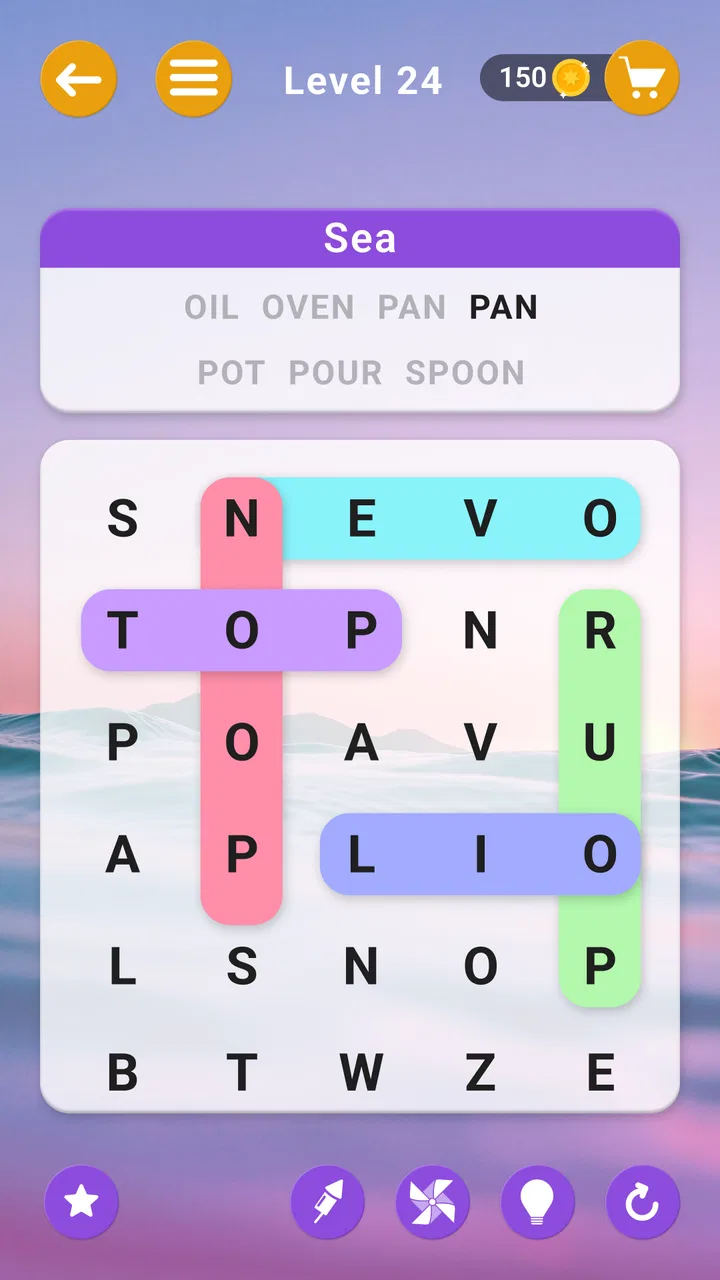
The central word-search format is easy to understand. A grid of letters gives you the main task, while a word list tells you what to find. That familiar arrangement means I did not need to spend time learning unusual controls. For a first-time player, the route from opening the game to beginning a puzzle feels much shorter than it does in many word apps filled with menus, currencies, and layered modes.
You May Also Like

 Blood Strike: 2.5 Anniversary
Blood Strike’s Loadouts Turn Every Drop Into a Tactical Gamble
A close look at Blood Strike’s custom loadouts: how fast access to signature weapons reshapes its battle royale rhythm, rewards preparation, and narrows the gap between fights.

 Pandora - Music & Podcasts
Pandora’s Music Is Easy to Start, but Harder to Recover
Pandora’s strength is its low-effort path from a seed to a station. Its weak spot is how much confidence it asks you to place in connection, setup, and quiet recovery.

 8 Ball Pool
 Is Built on Rivalries, Rematches, and Routine
A close look at the rivalries, rematches, shared routines, and unanswered safety questions that turn a quick pool match into a persistent mobile community.

 Samsung Music
’s Quiet Strength Is Playing What You Already Own
Its reach comes less from spectacle than from dependable access to a personal library. That simplicity is both the app’s strongest retention engine and its ceiling.

 AccuWeather: Weather Radar
AccuWeather Review: A Quick, Clear Forecast for Everyday Decisions
For everyday plans, the best forecast is the one you can understand quickly. AccuWeather makes rain timing, radar, and local conditions easy to act on, with a few trade-offs.

 Hill Climb Racing
Why Hill Climb Racing Still Turns Crashes Into One More Run
A tiny car, a bumpy hill and one more upgrade: Hill Climb Racing keeps resurfacing because its simple chaos makes every near-miss feel personal.
More From Our News Desk



That clarity is one of the strongest qualities here. The game is best when I can focus on the grid rather than on decorative screens. If you already know how a word search works, the basic interaction is self-explanatory: scan in different directions, identify a listed word, and mark it. This also makes it approachable for children and older players who may prefer a recognizable puzzle structure.
The store summary describes it as “Word Search Fun - Word Puzzles,” and that description fits the experience without needing a complicated explanation. It is a word puzzle game first, not a language course or a competitive brain-training system. I would therefore choose it for casual practice rather than for structured vocabulary learning.
Readability depends heavily on the device being used and on the individual player. Letter grids can become visually busy, especially when several possible words share similar paths. I found that the most useful habit was to stop searching randomly and work from the word list: pick a distinctive word, check likely starting letters, then trace horizontally, vertically, and diagonally. This reduces visual wandering and makes the puzzle feel less tiring.
That approach is especially helpful for players who lose their place easily. Instead of trying to remember every possible location, I treated each word as a small, separate task. When a word was difficult to see, I changed my viewing distance and searched by letter pattern rather than by reading the whole grid at once. It is a small adjustment, but it makes a noticeable difference during longer sessions.
Navigation is also easier for people who want a game with a low mental overhead. There is no need to manage a complicated build, remember a plot, or understand a large collection of resources. On the other hand, players who enjoy elaborate progression may find the presentation too plain. The same simplicity that helps beginners can feel limited to someone looking for a richer game loop.
What the free model means in everyday use
The game is free, but it includes in-app purchases ranging from $0.99 to $84.99 per item. That is worth keeping in mind before handing the device to a child or leaving purchases unrestricted. I would treat the free download as a way to test the basic experience, then decide whether the available purchase options fit the way the device is used at home.
For me, the important distinction is between access and convenience. A free word search is easy to try without committing money, while optional purchases can change how comfortable the longer-term experience feels. Anyone who dislikes in-app purchase prompts should check the game personally before recommending it to a child or to someone who wants a completely interruption-free puzzle routine.
The game has reached more than one million installs and carries an average rating of 4.3 from around 2.2 thousand ratings. Those figures suggest that the format has found a sizeable casual audience, but they do not replace personal testing. A word search can be enjoyable for one player and repetitive for another, particularly when the person wants novelty, competition, or a stronger sense of progress.
Motor control, vision, and sensory comfort
Word searches usually ask for a simple drag or mark across letters, so the physical demand is lower than in an action game. That makes this title a reasonable option for players who prefer slow interaction and time to think. I could pause between searches and approach the grid at my own pace instead of reacting to a timer or rapidly changing targets.
Still, selecting a word accurately can be harder than it looks. A player with limited fine motor control may find it difficult to begin on the correct letter and finish on the exact endpoint, particularly when the target is diagonal or close to another possible word. My practical advice is to use deliberate, slower movements and avoid trying to sweep across the grid in one rushed gesture. The game’s basic design supports calm play, but it does not remove the precision required by the puzzle.
This is where the game differs from a traditional paper word search. On paper, I can circle a word with any pen movement and correct a mistake visually. On a touchscreen, the gesture has to match the intended path more closely. A larger phone or tablet may be more comfortable than a small handset because the letters have more room around them, although the best choice depends on the player’s eyesight and hand control.
Visual fatigue is another realistic concern. A dense grid asks the eyes to compare repeated characters, and that can be demanding for players with low vision, reading difficulties, or sensitivity to clutter. I would not describe the game as a specialist accessibility tool. Instead, I see it as a simple puzzle whose suitability varies considerably with screen size, brightness, viewing distance, and the player’s ability to distinguish letters quickly.
A useful personal routine is to play in short rounds rather than treating the game as something to complete in one sitting. I also found it easier to search when the screen was free from glare and when I held the device at a stable angle. These are ordinary environmental changes, not features of the game, but they can make the difference between a relaxing puzzle and an uncomfortable visual task.
Hearing is less central to the word-search format than it is in games built around spoken instructions, music, or sound cues. A player who prefers silent play can engage with the core task visually. That makes the game practical in places where sound is inconvenient, such as a waiting room or a shared bedroom. At the same time, anyone who depends on audio feedback rather than visual confirmation may find the experience less suitable because the puzzle itself is fundamentally screen-based.
Why the familiar format helps some players
The biggest inclusive strength is predictability. The rules are recognizable, the objective is concrete, and the pace is controlled by the player rather than by fast-moving opponents. This can suit someone who becomes overwhelmed by complex game systems or who wants a focused activity after work. It can also work as a shared activity: one person can scan the grid while another calls out possible word locations.
I especially liked the possibility of using it in a quiet family setting without turning the session into a contest. A parent and child can search together, with the adult helping identify directions and the child choosing the next word. An older relative can participate without needing to learn a modern game convention. The simple structure leaves room for conversation, which is something many more elaborate games do not provide.
However, familiarity should not be confused with universal ease. A player who struggles with letter recognition may need another person to read the word list aloud. Someone with reduced hand stability may prefer to point while a companion performs the marking gesture. Those workarounds can make the game more inclusive, but they also show that the experience may depend on support from the device setup or another person.
Using it in different places and routines
This game fits naturally into short, interrupted sessions. I can imagine opening it while waiting for an appointment, during a commute when seated safely, or between household tasks. Because the activity does not require a long narrative memory, returning after a break feels easier than returning to a story-driven game. That makes it useful for people whose free time arrives in small pieces.
It is also a good choice for a low-pressure evening routine. I would rather use it when I want to occupy my attention without adding more noise or urgency. The word-search format gives me a clear stopping point: finish a puzzle, put the phone down, and continue later. Players who prefer games that can be played with one hand should be more cautious, though, because marking a word generally asks for a controlled movement across the grid.
For travel, the practical question is whether the game works comfortably in the conditions around you. A moving vehicle, poor lighting, reflections, or a cramped grip can make a letter grid harder to read and a selection harder to control. I would use it while seated and settled, not as an activity that demands attention while walking or handling something else. The puzzle is calm, but the surrounding situation still matters.
It can also be useful in a classroom or informal learning setting, but I would keep expectations realistic. Finding words may support attention to spelling and letter patterns, yet this is not the same as a guided lesson. A teacher or parent could choose a few target words and discuss them afterward, but the app itself should be treated as a practice activity rather than a complete educational method.
For adults who are learning English, the game may offer useful exposure to written words if the vocabulary is familiar enough to recognize. It becomes less helpful when the player spends all their effort decoding the word list instead of searching. In that situation, a dedicated vocabulary app or a paper puzzle with definitions may be a better match. The game’s strength is visual searching, not explanation.
Where it compares well with other word games
Compared with crossword puzzles, this game asks less from memory and general knowledge. I do not need to infer an answer from a clue or produce a word from scratch; I only need to locate a visible sequence. That makes it more approachable when I feel mentally tired. Crossword fans may find it too gentle, but people who want a clear visual task may prefer it.
Compared with anagrams, the experience is less focused on rearranging letters and more on scanning space. Anagram games can be better for players who enjoy generating many possible words, while this one suits people who like recognition and pattern hunting. The difference is important: if you enjoy finding a hidden route through a grid, this format feels satisfying; if you want constant word creation, it may seem passive.
Compared with competitive word games, there is less pressure to answer before another player does. That is a meaningful advantage for children, beginners, and anyone who dislikes public mistakes. The trade-off is that the game may provide less motivation for players who need rankings, live opponents, or a strong reward structure to keep returning.
Paper word searches remain a credible alternative. They can be easier to annotate, share, and use without worrying about touch precision or purchase prompts. The digital version is more convenient when I want a puzzle immediately and do not want to carry a book, but the paper option may be better for a group activity, a classroom table, or someone who prefers physical marking.
Barriers I would consider before installing
The first barrier is repetition. The core action remains searching a grid, so anyone seeking a wide range of mechanics may lose interest. I would not install this expecting a narrative adventure, a deep strategy system, or a major competitive community. It succeeds by keeping one activity accessible, not by constantly reinventing itself.
The second is touchscreen accuracy. Players with tremors, reduced dexterity, or difficulty maintaining a straight gesture may need patience or assistance. A stylus could potentially help with control on a compatible device, but I would not treat that as a guaranteed solution. The more reliable approach is to test the grid personally and see whether marking words feels comfortable.
The third is visual density. Even when the letters are technically readable, a busy arrangement can make searching tiring. Players with low vision should judge the actual display rather than assume that a simple word list guarantees easy access. A tablet may offer a more spacious view, while a small phone may be convenient to carry but less comfortable for extended play.
There is also a social and financial consideration around in-app purchases. Since the game is free to start but offers individual purchases, I would review the purchase controls on a shared device before letting a child play independently. This is not a reason to reject the game outright, but it is part of responsible setup, especially in a family environment.
Device compatibility is relatively broad: the current version is 3.0.15 and requires Android 8.0 or later. That gives owners of many still-used Android phones a reasonable chance of running it, although actual comfort will depend on the screen and the device’s performance. The game was released on May 26, 2022, so I see it as an established casual title rather than a brand-new experiment.
The age rating of Everyone makes the format easy to consider for mixed-age households. Even so, age suitability and usability are different questions. A young child may understand the goal but still need help reading words or controlling the gesture. An older player may enjoy the calm pace but prefer a larger display. I would make the decision based on the individual, not the age label alone.
My inclusive verdict for casual word play
I recommend this game to people who want a familiar, low-pressure word search that can fit into brief sessions. Its clearest strengths are the recognizable objective, the quiet pace, and the lack of a complicated learning curve. It is particularly appealing for families, casual puzzle players, and anyone who wants something more focused than scrolling but less demanding than a competitive word game.
I would skip it if your priority is advanced accessibility customization, rich vocabulary instruction, elaborate progression, or a deep variety of game modes. The simple format does not solve every visual or motor challenge, and the touchscreen selection may be frustrating for some players. In those cases, a paper word search, a crossword with adjustable text, or a purpose-built learning tool could be a better choice.
My most useful recommendation is to test it on the device that will actually be used, not just on a store page. Try a full puzzle in the intended lighting, check whether the letters remain comfortable to scan, and see whether marking diagonal words feels manageable. If a child or older adult will use it, watch the first session and decide whether independent play is realistic or whether shared play is more enjoyable.
AAA Fun has kept the idea uncomplicated, and that is both the reason to try it and the reason some players will move on. For me, it works best as a small, dependable interruption to a busy day: open the grid, search carefully, finish when ready, and stop without pressure. With realistic expectations about visual load, touch accuracy, and optional purchases, it is a solid free word puzzle for casual use and a potentially comfortable shared activity.
FAQs for Word Search - Word Puzzle Game
01What is Word Search - Word Puzzle Game and how does it work?
Word Search - Word Puzzle Game is an engaging app designed to test and improve your vocabulary skills. It features a grid of letters where you must find and highlight words hidden in various directions. The game offers multiple levels of difficulty, ensuring a challenging experience for all ages. Players can enjoy themed puzzles, time challenges, and daily rewards.
02Is Word Search - Word Puzzle Game free to play?
Yes, Word Search - Word Puzzle Game is free to download and play. However, it offers in-app purchases that enhance the gaming experience, such as hints and additional puzzle packs. While these purchases are optional, they can help players progress through more challenging levels or access unique content.
03Can I play Word Search - Word Puzzle Game offline?
Yes, Word Search - Word Puzzle Game can be played offline, making it perfect for on-the-go entertainment without an internet connection. Once downloaded, you can access most features and levels without Wi-Fi or data. However, certain features, like in-app purchases or leaderboard updates, may require an online connection.
04Is Word Search - Word Puzzle Game suitable for all ages?
Word Search - Word Puzzle Game is family-friendly and suitable for players of all ages. Its intuitive design and adjustable difficulty levels make it accessible to children and adults alike. The app promotes cognitive development and vocabulary enhancement, making it both educational and entertaining.
05Are there any ads in Word Search - Word Puzzle Game?
Yes, the free version of Word Search - Word Puzzle Game includes ads. These ads help support the developers and keep the game free for users. Players can choose to remove ads through a one-time purchase, enhancing their gaming experience by eliminating interruptions and distractions.
Pros
- Engaging puzzles for all skill levels.
- Simple
- intuitive interface design.
- Regular updates with new levels.
- Offline mode available for travel.
- Hints feature helps when stuck.
Cons
- Ads can be intrusive at times.
- No multiplayer mode available.
- Limited themes for customization.
- In-app purchases can be pricey.
- Occasional lag on older devices.

Word Search - Word Puzzle Game
Gallery